Custom Robot Workstations And Laser Systems Manufacturer


Autonomous Trajectory Planning in Robotic Welders:What It Means for Your Production Line
Every robotic welding cell has a trajectory — a sequence of positions, angles, and timings that tells the robot exactly where to move and when. In a traditional cell, a human creates that trajectory manually: a programmer with a teach pendant, spending two to eight hours guiding the robot arm through every point of every joint on every new part. Trajectory planning is the most time-consuming, most skill-dependent, and most limiting step in the entire robotic welding workflow.
Autonomous trajectory planning removes the human from that step. The system plans its own weld paths — derived from 3D scan data or digital models, optimised for joint quality, access geometry, and distortion control, and verified for collision safety before a single arc opens. The programmer is not reassigned to a different task. The programmer is no longer part of the process.
What Is Trajectory Planning in a Robotic Welding Cell?
Trajectory planning is more than drawing a line along a weld seam. A weld trajectory must simultaneously satisfy several competing constraints:
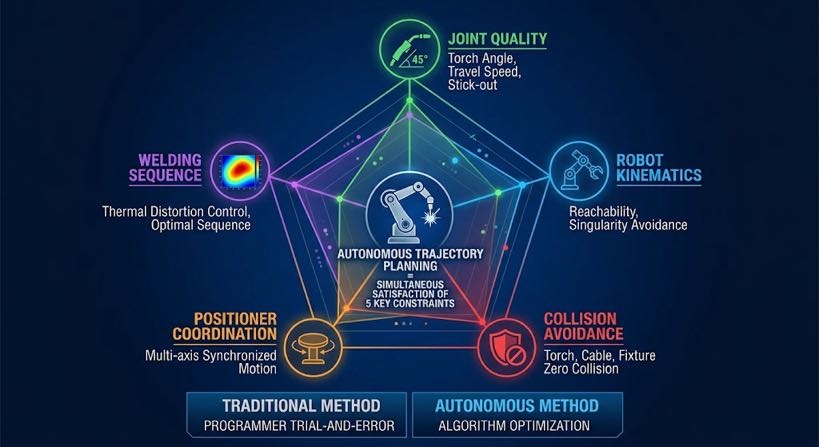
- Joint quality: torch angle, travel angle, and standoff distance must stay within the ranges that produce acceptable weld bead geometry for the joint type and position
- Robot kinematics: the planned positions must be reachable by the robot without singularities — configurations where the robot loses a degree of freedom and motion becomes unpredictable
- Collision avoidance: the torch, robot arm, and cable package must not contact the workpiece, fixture, or positioner at any point along the path
- Positioner coordination: if the part needs to rotate between joints, the positioner motion must be planned and synchronised with robot motion
- Weld sequence: the order in which joints are welded affects thermal distortion accumulation — the trajectory planner must consider distortion when sequencing
In a traditional robotic welding cell, a human programmer satisfies all five constraints simultaneously, through trial and error at the teach pendant. In a cell with autonomous trajectory planning, a software system does it — faster, more consistently, and without requiring a programmer on staff.
Manual Trajectory Planning vs Autonomous Trajectory Planning
The difference between the two approaches is not simply speed. It is a fundamental change in what the system knows and when it knows it.
| Dimension | Manual (teach pendant) | Autonomous (vision-guided) |
| Source of joint position | Programmer’s memory of where the joint is | 3D scan of actual part — measured, not assumed |
| Part variation handling | Fixed path — fails when part deviates | Path generated per scan — adapts to each part automatically |
| Time per new part number | 2–8 hours teach time | < 5 minutes scan + auto-generate |
| Programmer skill required | Robot-certified programmer, $60K–$120K/year | Cell operator, 2-week training |
| Collision checking | Manual — programmer watches for clashes | Digital twin simulation — every position checked before arc opens |
| Weld sequence optimisation | Experience-dependent — varies by programmer | Constraint-based algorithm — consistent, repeatable output |
| Distortion control | Heuristic — depends on programmer knowledge | Systematic — sequence planner balances heat input across weldment |
| New configuration risk | First-part crash risk — programmer must intervene | Zero crash risk — digital twin verifies before execution |
| Part mix scalability | Degrades — more parts = more programmer time | Scales freely — each part scanned fresh, no program accumulation |
The last row is the most significant for production planning. A traditional robotic cell accumulates programming debt as your part mix grows — more active part numbers means more programs to maintain, more reprogramming when designs change, and more programmer time that cannot be recovered. A cell with autonomous trajectory planning has no program library. Every part is planned fresh from its scan. Part mix growth does not increase overhead.
How Autonomous Trajectory Planning Works — Inside the System
The planning process takes place between the seam extraction step and the robot execution step. It consists of four computational stages that run in sequence in under 60 seconds for most structural steel weldments.
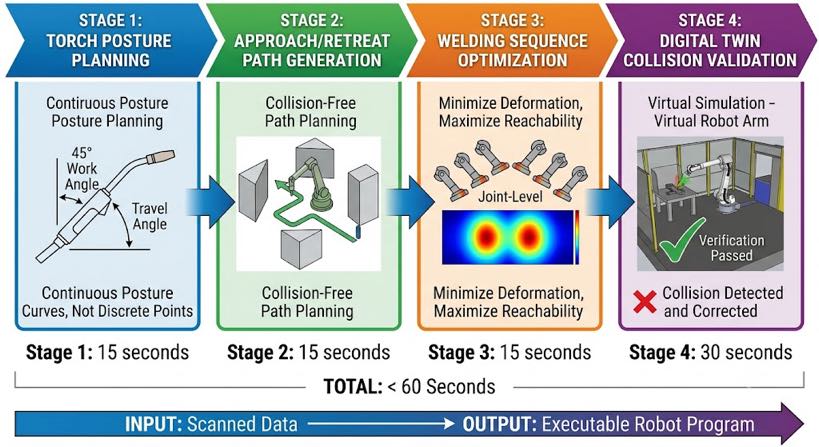
Stage 1: Torch orientation planning
For each identified weld joint, the planner calculates the optimal torch work angle and travel angle based on joint type, welding position, and material thickness. These are not fixed values — they vary along the joint length if the joint curves or changes angle. The planner generates a continuous torch orientation profile, not a series of discrete waypoints.
For fillet welds on structural steel, the standard work angle is 45 degrees to the joint bisector with ±5 degree tolerance. For butt welds, the torch is perpendicular to the joint plane. For T-joints with restricted access, the planner calculates the maximum achievable work angle given the geometric constraints and checks whether it falls within the acceptable range for that joint class — flagging joints where access is too restricted for a reliable weld.
Stage 2: Approach and retract path generation
The torch must approach the joint start from a clear position and retract to a clear position after the weld end — without colliding with the part, fixture, or any other structure. For simple open joints, approach and retract paths are straightforward. For transformer tanks, box columns, or structural frames with congested geometry, the approach path must navigate around cooling fins, stiffening ribs, and other obstructions.
The planner uses the 3D scan geometry to model the workspace around each joint and computes a collision-free approach and retract path using motion planning algorithms. The planned paths are added to the digital twin model for verification in Stage 4.
Stage 3: Weld sequence optimisation
With individual joint trajectories planned, the sequence planner determines the optimal order to execute them. This is an optimisation problem with multiple objectives:
- Minimise distortion: alternate weld direction, balance heat input symmetrically across the weldment
- Preserve access: weld joints that would become inaccessible after adjacent welds are completed, before those adjacent welds run
- Minimise robot travel time: group joints by physical proximity where distortion and access constraints allow
- Coordinate positioner rotations: plan part repositioning between joint groups to minimise rotation count while maintaining optimal welding position
For a structural steel weldment with 15 to 30 joints, the sequence planner evaluates thousands of candidate orderings and selects the one that best satisfies all four objectives simultaneously. The output is a complete weld sequence — not just a list of joints, but a time-ordered plan including positioner rotations, interpass dwell times, and robot transit paths between joints.
| Why sequence matters more than most buyers realise: A structural weldment welded in the wrong sequence can accumulate 3–8 mm of angular distortionon a 2-metre beam — enough to fail dimensional inspection. The same weldment welded in theoptimised sequence accumulates < 1 mm. The weld parameters are identical. The difference isentirely in the sequence. Autonomous planning gets this right consistently; manual programmingdepends on the programmer’s experience with that specific joint configuration. |
Stage 4: Digital twin collision verification
The complete planned sequence — approach paths, weld paths, retract paths, transit moves, and positioner rotations — runs in a full-size virtual simulation of the workcell before any physical motion occurs. The digital twin is built from the 3D scan of the actual part (not a nominal CAD model), so it reflects the real geometry of this specific weldment.
Collision detection checks every robot configuration along every planned motion for interference with the part, fixture, positioner, and workcell enclosure. If a collision is detected, the planner revises the offending path — adjusting approach angle, standoff distance, or transit route — and re-verifies. The process repeats until the entire sequence passes collision checking.
The operator reviews the verified simulation on the touchscreen — a time-compressed video of the complete weld sequence — before confirming execution. First-article welds on new part configurations run with the same confidence as repeat production, because the collision risk has been resolved in simulation, not discovered by crashing the robot.
What Autonomous Trajectory Planning Changes on Your Production Line
The technology description above is useful, but the production manager’s question is more practical: what is different about how my line operates the day after this system is installed? The answer covers five areas.
1. New part launch time drops from days to hours
In a traditional robotic welding cell, launching a new part configuration involves: programmer reviews drawing, programmer teaches path at robot, first-article weld, quality check, program revision, second-article weld, approval. This cycle typically takes one to three days for a complex structural part. The robot is unavailable for production during most of this time.
With autonomous trajectory planning: operator loads part, initiates scan, system generates and verifies path, operator confirms on touchscreen, first-article weld runs. The total elapsed time is two to four hours, the robot is available for production within the same shift, and the operator does not need robot programming skills.
2. Part mix growth stops being an overhead problem
Every new part number in a traditional cell means another program to write, store, and maintain. Design revisions mean program updates. Fixture changes mean path re-teaching. A shop with 40 active part numbers and two design revisions per part per year is managing 80 program update cycles annually — at three hours each, that is 240 hours of programmer time, or roughly $21,600 at $90 per hour. This cost grows linearly with part mix.
With autonomous trajectory planning, there is no program library to maintain. Each part is planned fresh from its scan. Adding a new part number costs exactly the same as running a repeat part: one scan, one auto-generated plan, one digital twin verification. The overhead is flat regardless of how many active part numbers the shop carries.
3. Weld quality becomes more consistent across operators and shifts
Manual trajectory planning produces results that vary with the programmer’s experience, fatigue, and familiarity with the specific part. An experienced programmer plans better paths than a junior one. The night shift may produce different results than the day shift. These variations show up in weld quality — inconsistent throat size, variable distortion, differing arc-on time per joint.
Autonomous trajectory planning produces the same path from the same scan data regardless of who is operating the cell, what shift it is, or how many parts have been run that day. Weld quality consistency becomes a function of the scan quality and the weld schedule library — both of which are controlled inputs — rather than a function of individual programmer skill.
4. First-article risk is eliminated on new configurations
The most expensive single event in a traditional robotic welding cell is a first-article crash — the robot collides with the part on the first run of a new configuration, damaging the torch, the part, or the robot. Crashes happen because manual path planning cannot perfectly predict every collision scenario on complex geometry, and the programmer must physically watch the first run ready to hit the emergency stop.
Digital twin verification eliminates first-article crashes by running the complete sequence in simulation before any physical motion. The operator does not stand ready at the emergency stop — they review the simulation, confirm it, and walk away. The robot executes without supervision because the collision risk was resolved before the arc opened.
5. The positioner and robot operate as a coordinated system
In a manually programmed cell, the robot path and the positioner rotation are typically planned separately and coordinated by the programmer through trial and error. The result is often a conservative sequence: the positioner completes a full rotation and stops, then the robot begins welding, then both stop, then the positioner rotates again. Robot idle time accumulates between joint groups.
Autonomous trajectory planning treats the robot and positioner as a coordinated multi-axis system. The planner calculates simultaneous robot and positioner motion — the positioner can rotate while the robot transits between joints — minimising idle time and maximising arc-on time. For a structural weldment requiring four positioner rotations, coordinated motion can reduce total cycle time by 15 to 25 percent compared to sequential stop-and-start operation.
What Autonomous Trajectory Planning Does Not Do — Stated Honestly
Autonomous trajectory planning is a significant capability, and it is worth being precise about what it does and does not replace.
| It replaces | It does not replace |
| Teach pendant programming for path generation | Welding engineer expertise for weld parameter development |
| Manual collision checking and crash risk management | Operator judgement for flagging unusual scan results or part defects |
| Programmer time for new part launches | Quality inspector’s role in verifying completed welds |
| Heuristic distortion control from programmer experience | Fixture design and part positioning expertise |
| Manual weld sequence planning | Metallurgical knowledge for new material or joint qualification |
The welding engineer remains essential. The weld schedule library — the database of validated parameters for each joint type, material, and thickness combination — must be built by someone who understands welding metallurgy and has the equipment to run qualification tests. What autonomous trajectory planning removes is the step that previously consumed most of the robot operator’s time: the manual path teaching that happened between the engineer’s parameter specification and the robot’s execution.
Frequently Asked Questions
How is autonomous trajectory planning different from offline programming?
Offline programming (OLP) generates robot paths in simulation software from a CAD model, then uploads them to the robot controller — reducing teach pendant time but still requiring a programmer. Autonomous trajectory planning generates paths from the actual scanned part geometry, with no programmer involvement and no CAD model required. OLP still fails when the real part deviates from the CAD model; autonomous planning adapts to the real part because it plans from the real part. See Blog 03 for a detailed comparison of all three approaches.
What happens when the trajectory planner cannot find a valid path for a joint?
When the planner cannot generate a collision-free path that satisfies torch angle requirements — for example, a joint in a very confined location between structural members — it flags that joint as ‘requires manual review’ and presents the issue to the operator on the touchscreen before the sequence runs. The operator can either adjust the part fixturing to improve access, consult the welding engineer about an acceptable alternative torch angle, or mark the joint for manual welding. The system does not skip joints silently or weld at an unacceptable angle without notification.
Does the system re-plan if the part shifts during welding?
The pre-weld scan and trajectory are generated from the part’s position at scan time. If the part shifts significantly during welding — for example, if a clamp releases under thermal expansion — the in-weld arc tracking system detects the seam deviation and corrects torch position within its compensation range (typically ±3 to 5 mm lateral deviation). If the deviation exceeds the arc tracking range, the system generates an alert and pauses. For most structural steel production with adequate fixturing, in-weld arc tracking handles the positional drift that occurs during a normal weld cycle without requiring re-planning.
How long does the planning process take on a complex structural weldment?
For a typical structural steel weldment with 10 to 20 joints — a beam bracket assembly, a stiffened frame section, or a small box column — the complete autonomous planning cycle takes 45 to 90 seconds from scan completion to executable program. For complex weldments with 40 to 80 joints — such as a transformer tank body — planning takes 3 to 6 minutes. The digital twin verification adds 1 to 3 minutes of operator review time. Total elapsed time from part load to first arc is under 10 minutes for the large majority of structural steel production scenarios.
Can the system learn from previous welds to improve future paths?
Current production systems use validated weld schedule libraries and physics-based path planning rather than machine learning — because in certified structural welding applications, the traceability and predictability of physics-based planning is required for weld procedure qualification. The system does accumulate data: weld logs record actual arc parameters, deviation alerts, and quality outcomes per joint, which welding engineers use to refine the weld schedule library over time. This is a structured engineering improvement process, not autonomous learning in the AI sense.
Next Steps
If this article has clarified what autonomous trajectory planning means in practice, the logical next step depends on where you are in your evaluation:
- If you want to understand the scanning and reverse modeling steps that feed trajectory planning, read Blog 04: 3D Vision Laser Seam Tracking Explained and Blog 05: Scan-to-Weld Technology.
- If you want to see how trajectory planning applies to a specific structural steel application — large, non-repetitive parts — read Blog 06: Transformer Tank Welding Automation.
- If you are ready to evaluate whether the complete system — scanning, reverse modeling, autonomous planning, and gap-adaptive welding — delivers the ROI your business case requires, read Blog 08: ROI of a No-Programming Robotic Welding Cell: Real Numbers from Structural Steel Applications.
- If you have a specific structural steel part and want to see autonomous trajectory planning generate a weld path for it, send us the drawing or a 3D model. We will run the full planning cycle and return the path preview, cycle time estimate, and digital twin verification video.
| Talk to Our Welding Automation Engineers Send us your part drawing or describe your production challenge. We’ll show you how autonomous trajectory planning works on your actual structural steel parts — no commitment required. ✉ Contact Us Now → Calculate My ROI First ✓ No commitment required ✓ Response within 24 hours ✓ Free cycle time estimate |
About the Author
Experience & Credentials
Robotic welding system integration specialist with 12+ years of direct project experience focused on Robot Positioner selection and integration. Has provided consulting to 300+ factories across North America, Europe, and Asia.
Company background: 26+ years of welding automation engineering, 40+ active patents, 1,500+ completed projects globally, approximately 70% involving Robot Positioner integration.
Certifications
- ISO 9001: 2015 (GB/T 19001-2016) — Quality Management System
- GJB 9001C-2017 — Military/Weapon Equipment Quality Management System
- EU CE — Machinery Directive 2006/42/EC (Cert. No. M.2026.206.C134866)
- High-Tech Enterprise — Cert. No. GR202341000595 (Issued Nov. 2023)
Last updated: Jun 2026
RELATED POSTS
3D Vision Laser Seam Tracking Explained:From Point Cloud to Weld Path in Seconds
Head-and-Tailstock vs. L-Type vs. U-Type Robot Positioner: How to Choose by Workpiece Shape
Robot Positioner ROI: How Much Is Manual Welding Actually Costing You?
Robotic Laser Welding Mastery: 10 Practical Tips for Maximum Performance and ROI
How to Calculate Robotic Welding Cell ROI in 2026: Complete Template with Real-World Cases