Custom Robot Workstations And Laser Systems Manufacturer


Scan-to-Weld Technology:How Reverse Modeling Replaces Robot Programming
There is a step between scanning a weld joint and the robot beginning to weld it that most articles skip over. The 3D scanner captures a point cloud. The arc opens. Something happened in between — something that used to take a programmer two to eight hours and now takes a software system under five minutes. That something is reverse modeling .
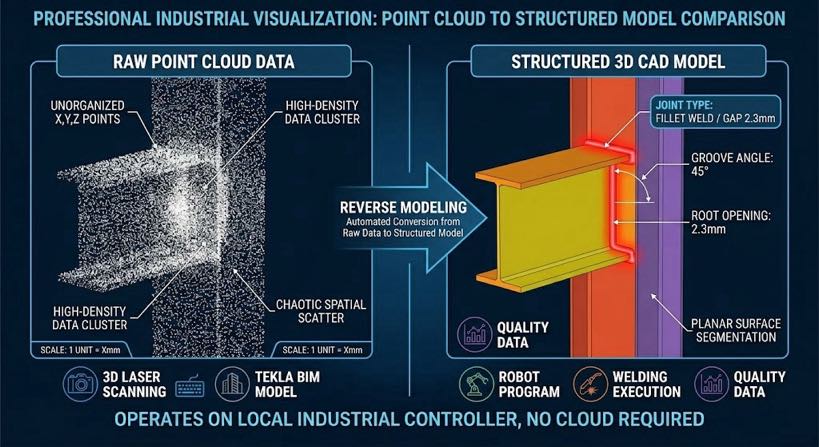
Reverse modeling is the process of taking raw scan geometry and converting it into a structured 3D model with identified surfaces, joint features, and weld seam parameters that a robot motion planner can act on. It is the bridge between sensing and execution. And critically, it works whether the weld model originates from a physical scan, a Tekla Structures export, or a parametric template — your existing digital investment is an input, not an obstacle.
This article explains how reverse modeling works, why it matters for structural steel fabrication specifically, and what it means in practice for both shops that have detailed Tekla models and shops that receive nothing but a steel sample and a verbal specification.
| Reading guide — where to start based on your background: New to 3D scanning and point clouds? → Read Blog 04: 3D Vision Laser Seam Tracking Explained first. It explains what a point cloud is, how laser scanners build one, and what ‘seam extraction’ means — in plain language, no prior knowledge needed. |
The Step Nobody Talks About: From Point Cloud to Weld Program
When vendors describe no-programming robotic welding, they often compress the process into two steps: scan the part, start welding. That compression hides the most technically significant step in the chain. A raw point cloud — the millions of x, y, z coordinate measurements a 3D laser scanner captures from the part surface — is not a weld program. It knows where surfaces are but not what they are. It cannot distinguish a weld groove from a tack weld scar or a fixture clamp. It has no concept of joint type, weld sequence, pass count, or torch angle.
| Point cloud: A dense set of 3D coordinate measurements (x, y, z) captured by a laser scanner from a physical surface. Think of it as a digital “dot map” of the part — precise, but unstructured. Reverse modeling gives it structure. |
Converting a point cloud into a weld program requires structured interpretation, and that is what reverse modeling provides. The traditional alternative was a human programmer with a teach pendant, who provided the structural interpretation manually: ‘this is a fillet joint, the root is here, the torch goes at 45 degrees, we need two passes.’ Reverse modeling automates that interpretation — identifying joint geometry from point cloud features and deriving all the parameters the weld path planner needs, without human input.
| The correct mental model for scan-to-weld: Model input → [Reverse modeling] → Structured weld geometry → [Path planning] → Robot program Model input can be: physical scan (point cloud) | Tekla export | parametric template Reverse modeling is the interpretation layer. Without it, any input — scan or CAD — is just data. |
What Is Reverse Modeling in Welding Automation?
| Reverse modeling in welding automation is the computational process ofreconstructing a structured 3D geometric model from input data — whether from a physicalscan (point cloud), a BIM/CAD export, or a parametric definition — identifying weld jointfeatures within that model, and extracting the parameters needed to generate a robot weldpath automatically. |
The term ‘reverse’ distinguishes this from traditional forward-programming, where a programmer manually teaches the robot each path position. In reverse modeling, the geometry model — whether from a scan or from Tekla — is the source of truth. The system derives the weld program from it automatically.
| Tekla Structures: A structural steel BIM (Building Information Modeling) software widely used in fabrication shops to create detailed 3D models of steel connections, beams, columns, and frames. In scan-to-weld integration, Tekla models feed joint geometry directly into the reverse modeling engine — no physical scan required for parts that already have a current model. |
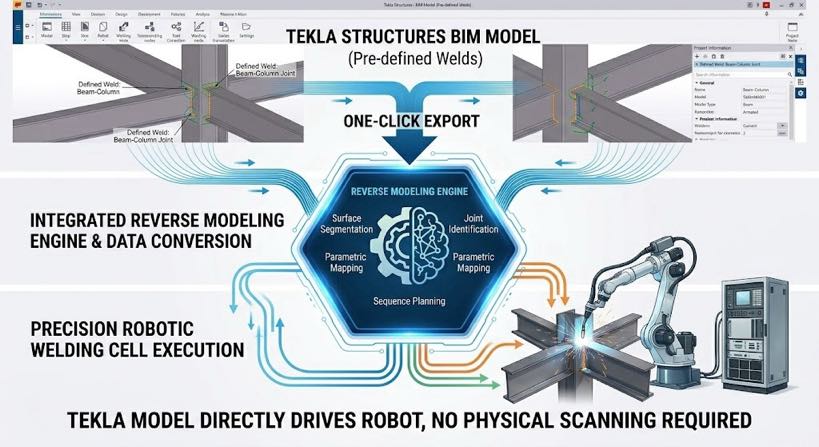
For large structural steel fabricators with mature Tekla workflows, this is actually the fastest path available: a one-click Tekla export feeds joint geometry directly into the reverse modeling engine, bypassing the physical scan step entirely. Your Tekla investment accelerates the process; it does not compete with it.
For shops without digital files — repair work, customer-supplied samples, legacy parts — the physical scan replaces the Tekla input and feeds the same reverse modeling pipeline. The weld program output is identical regardless of which input path was used.
When each input path applies
| Input path | Starting point | Best for | Time to weld program |
| Tekla Structures export | Existing 3D structural model | Fabricators with current Tekla models — fastest path, no scan required | < 2 minutes |
| Parametric modeling | Key dimensions entered by operator | Standard sections: beams, columns, brackets — defined by thickness, length, joint type | 2–4 minutes |
| 3D scan → Reverse modeling | Physical part scanned on workcell | Repair work; parts with no CAD; customer samples; as-built geometry verification | 3–5 minutes |
All three paths converge at the same weld program output, use the same weld schedule library, and feed the same sequence planner. Choosing between them is a workflow question, not a capability question.
How Reverse Modeling Works — Five Steps from Input to Program
The process below describes what happens inside the reverse modeling engine regardless of input path. The five steps are the same; only the data format at Step 1 differs.
Step 1: Geometry ingestion and surface segmentation
The reverse modeling engine receives the input geometry — raw point cloud, Tekla IFC/XML export, or parametric definition — and segments it into distinct planar and curved surfaces. For a point cloud, the algorithm fits planes to clusters of coordinate points and identifies boundaries where surface orientation changes. For a Tekla model, the surfaces are already defined; the engine reads them directly and identifies candidate joint locations from surface intersections.
For structural steel, the primary surfaces are mostly planar — flat plate, angle sections, box sections — which makes segmentation reliable regardless of input format.
Step 2: Joint feature recognition
Within the segmented surfaces, the system identifies weld joint features — the geometric configurations that define each joint type. A fillet joint is the intersection of two planes at an angle. A V-groove butt joint is two bevelled surfaces converging to a root gap. A T-joint is a vertical plane meeting a horizontal one at 90 degrees.
The recognition algorithm matches measured geometry against a library of joint templates. When a match is found above a confidence threshold, the joint type is classified and key parameters extracted:
- Joint centreline position in 3D space
- Joint type: fillet, butt, T-joint, lap, groove
- Gap width at each point along the joint length
- Bevel angle and root face for groove welds
- Robot access angle — whether the torch can reach the joint without collision
If extracted geometry does not match a known joint template above the confidence threshold — perhaps because fit-up is unusually poor or a tack weld obscures the root — the system flags the joint for operator review. The system does not weld from ambiguous data.
Step 3: Weld parameter mapping
Once joint type and geometry are classified, the system maps extracted parameters to the weld schedule library — validated process parameters for each joint configuration: voltage, wire feed speed, travel speed, shielding gas, and pass count.
The mapping is not a simple lookup. Gap width varies along the joint length, and the system calculates parameter values for each cross-section continuously. A 1 mm gap at the joint start and a 3.5 mm gap at the joint end require different wire feed rates and travel speeds at each point — the program adjusts them as a continuous function, not a stepped average.
| Why this matters for AWS D1.1 compliance: AWS D1.1 specifies minimum effective throat for partial-penetration groove welds andminimum leg length for fillet welds based on actual joint geometry — not nominal gap.A weld program using fixed parameters regardless of actual gap will under-fill wide-gapsections and over-deposit on tight sections. Gap-adaptive parameter mapping eliminatesboth failure modes at the program generation level. |
Step 4: Weld sequence planning
A weld program is not just a collection of individual joint paths — it is a sequence with logic. The sequence planner determines the order in which joints are welded, accounting for:
- Distortion control: alternating weld direction to balance heat input across the weldment
- Access hierarchy: welding joints in the order that maintains robot reach throughout the sequence
- Positioner coordination: rotating the part to present joints in the flat or horizontal position
- Multi-pass planning: interpass requirements and pass sequence for thick joints
Sequence planning is the step most often underestimated in welding automation. A cell that generates individual joint paths accurately but sequences them poorly will produce distorted parts with robot access problems on later joints. The constraint-based planner optimises all four criteria simultaneously.
Step 5: Robot program output
The final output is a complete robot program: robot joint positions, torch angles, positioner commands, and weld parameter calls that the robot controller executes directly. From input geometry to executable program: under five minutes for a typical structural steel weldment with five to fifteen joints. The operator confirms on the touchscreen and initiates welding — no programmer involved at any point.
Why This Changes the Economics for Structural Steel Fabricators
For fabricators with Tekla models: programming time drops to near zero
Large structural steel fabricators often have mature BIM workflows — every part has a Tekla model, connection details are fully resolved, and shop drawings are generated automatically. The missing link has always been the last step: converting that digital model into robot weld programs still required a programmer at the teach pendant.
With Tekla-to-weld integration via reverse modeling, that last step is automated. The Tekla model that took engineering hours to build now drives the robot directly — one click exports the joint geometry, the reverse modeling engine interprets it, and the weld program is ready before the part reaches the workcell.
For job shops without CAD files: automation becomes accessible for the first time
Structural steel job shops working from sketches, customer samples, or verbal specifications have historically been excluded from robotic automation entirely — because every automation vendor required a CAD file as the starting point. Reverse modeling from physical scan changes this: the part itself is the input.
The economic crossover point — the production volume at which automation pays off — drops from 30–50 identical parts per program to effectively 1. Whether the shop runs one of a configuration or one hundred, the programming overhead is zero.
| Rework reduction: shops implementing scan-to-weld report reductions from 3–8% of weldoutput to under 1% rework. On $3M annual weld revenue, that is $60,000–$210,000 per yearin rework cost eliminated — driven by gap-adaptive parameter mapping that a fixedprogrammed path cannot provide. |
Frequently Asked Questions
Is reverse modeling the same as 3D scanning?
No — they are sequential steps. 3D scanning captures raw point cloud data from the physical part (see Blog 04 for a full explanation of how this works). Reverse modeling interprets that data: segmenting surfaces, recognising joint features, mapping weld parameters, and planning the weld sequence. The scanner produces data; reverse modeling produces a weld program. When the input is a Tekla model rather than a scan, the scanning step is bypassed entirely — reverse modeling works directly from the digital geometry.
Does our existing Tekla model work directly with this system?
Yes — Tekla Structures integration is the fastest input path available. A one-click export from Tekla sends the joint geometry directly to the reverse modeling engine, which detects joint types, extracts parameters, and generates the weld program without a physical scan. For shops already on Tekla, this eliminates the scanning step and reduces time to first weld on a new part to under two minutes from program generation.
How does the system handle parts with significant distortion from cutting or thermal processing?
For parts input via physical scan, the reverse modeling engine builds its model from actual as-built geometry — distortion is captured and incorporated into the weld path automatically. For parts input via Tekla, the as-designed geometry drives the path; if significant as-built deviation is expected (e.g., flame-cut plate with thermal bow), a fast verification scan pass before welding is recommended. The system supports a hybrid workflow: Tekla model for joint detection plus a verification scan for position confirmation.
Can the system handle multi-level weldments with overlapping joints?
Yes. For complex weldments where some joints are obscured by other structural members, the system supports multi-pass scanning from multiple angles or robot positions, registering and merging the point clouds into a single model before joint recognition runs. For Tekla-input weldments, all joints are visible in the model regardless of physical access complexity — the sequence planner accounts for actual robot access constraints. This is a standard workflow for structural frames, box columns, and transformer tank bodies.
Does this require cloud processing or internet connectivity?
No. All reverse modeling computation runs on the local industrial controller — specified for real-time processing of complex structural point clouds with no network dependency. This matters for shops with IT security policies that prohibit cloud-connected production equipment and for sites with unreliable connectivity. Weld data logs are stored locally and exported to quality management systems via local network.
Next Steps
- To understand the 3D scanning step that produces the point cloud for reverse modeling — including what a point cloud is, how laser scanners build one, and how seam extraction works — read Blog 04: 3D Vision Laser Seam Tracking Explained.
- To see the complete no-programming workflow in the context of a full cell, read Blog 03: No-Programming Robotic Welding Cell: How Vision-Guided Systems Eliminate Teach Pendants.
- To test the system on your own work: send us a Tekla model, a part drawing, or a photo of the joint. We will generate a reverse modeling path and return a program preview, cycle time estimate, and weld cross-section — no commitment required.
About the Author
Experience & Credentials
Robotic welding system integration specialist with 12+ years of direct project experience focused on Robot Positioner selection and integration. Has provided consulting to 300+ factories across North America, Europe, and Asia. All specification data in this article is drawn from actual H / B / L / U series product datasheets.
Company background: 26+ years of welding automation engineering, 40+ active patents, 1,500+ completed projects globally, approximately 70% involving Robot Positioner integration.
Certifications
- ISO 9001: 2015 (GB/T 19001-2016) — Quality Management System
- GJB 9001C-2017 — Military/Weapon Equipment Quality Management System
- EU CE — Machinery Directive 2006/42/EC (Cert. No. M.2026.206.C134866)
- High-Tech Enterprise — Cert. No. GR202341000595 (Issued Nov. 2023)
Last updated: Jun 2026
RELATED POSTS
Why Vision Systems Are Essential for Robotic Laser Welding
Why Add a 7th Axis Robot? 5 Powerful Ways to Boost Productivity & Cut Costs in 2026
Robotic Laser Welding ROI Analysis: Is It Worth the Investment?
2026 Robot Positioner Buyer’s Guide: All 5 Types Compared — Head-and-Tailstock, L-Type, U-Type, and More
2026 Welding Automation Pain Points: Why Competitive Factories Are Choosing a Robot Positioner